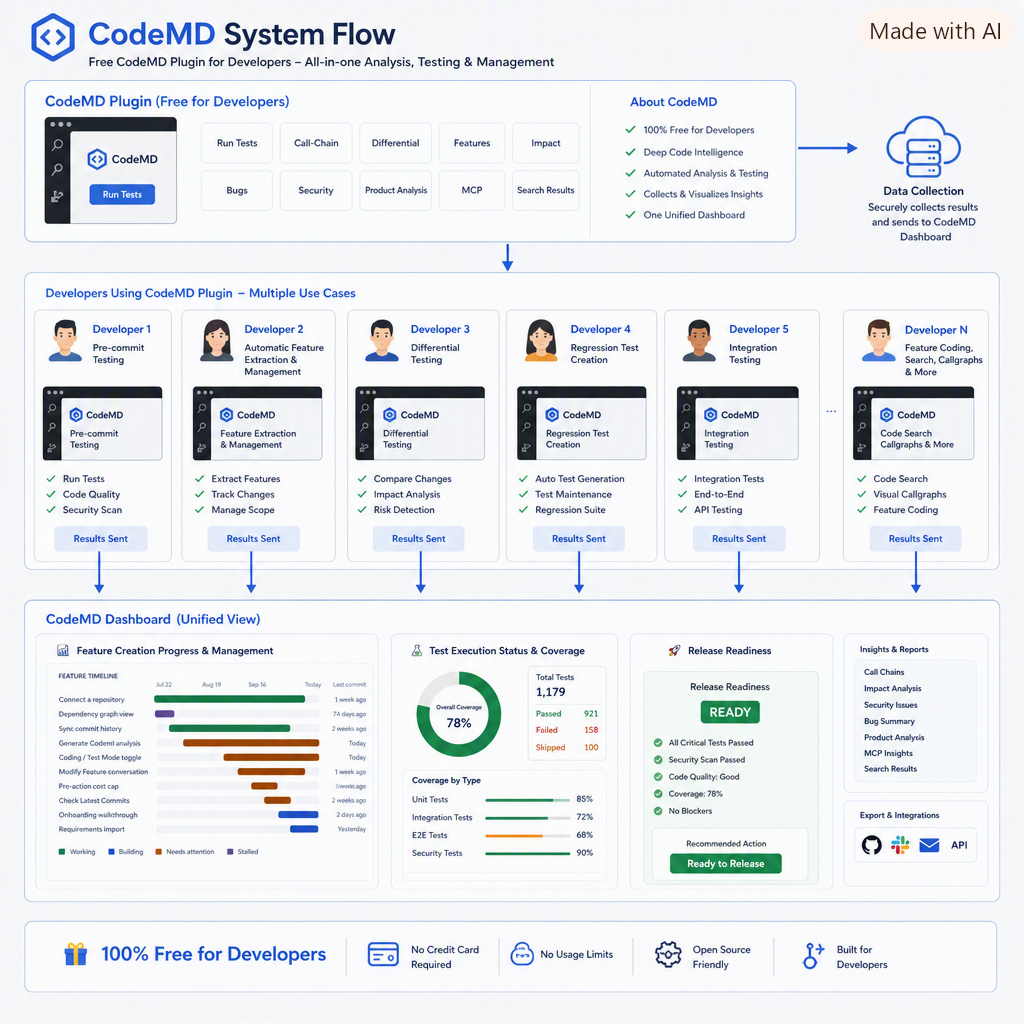
Free VS Code testing plugin · Team FeatureDashboard
Test every coding-agent change for free! Track every feature to release.
The free CodeMD plugin maps call paths, shows the impact of each change, and runs the relevant tests before you commit—free with CodeMD or using your existing coding-agent subscription. Results roll up into one dashboard of feature progress, test coverage, and release readiness.
Analysis runs locally. Tests run in an isolated copy of your workspace. On codemd.dev, tests run in your repository's own GitHub Actions, never on our servers.
Step 1 · In VS Code · Up next: the narrated walkthrough
The developer installs the free CodeMD plugin
Before you commit, CodeMD tests your coding agent's change with Claude Code, Codex, or free with local Ollama. One click checks the change; Ollama Auto Mode then runs, finds, creates and fixes tests for every changed function. Tests run in an isolated copy of your workspace.
Finds and runs your existing tests
The tests that call the changed code, found from the call graph.
Files code and security bugs
Real failures and security review findings go on the Bugs tab.
Runs differential tests
Runs the code before and after the agent's change and checks that every difference is one you expected.
Creates the tests your agent didn't write
- New-Function unit test from a new function's signature and body
- Call-Path through one real caller of the change
- Call-Chain changed functions that call one another
- Highest-Risk Direct-Caller aimed at the riskiest caller
- Contract the arguments callers pass and the result they rely on
- Multi-Caller different calling patterns across real callers
- Replay free; replays inputs seen at a real call site
3 functions changed · not yet committed
calculate_invoice_total()billing/invoice.pyapply_discount()billing/discounts.pyformat_receipt()billing/receipts.pyHow it works
Three steps, all inside VS Code.
Change your code
Edit as usual, by hand or with your coding agent. CodeMD sees which functions you changed.
CodeMD finds the relevant tests
It follows your code's call graph from each changed function to the existing tests that exercise it.
It runs them before you commit
Those tests run in an isolated copy of your workspace. You see pass or fail, and which changed functions have no tests.
On codemd.dev, tests run in your own GitHub Actions
GitHub Actions is GitHub's own cloud machines running your workflow. Your code never runs on CodeMD's servers.
GitHub starts a temporary machine
For each test run, GitHub spins up a fresh machine, runs the steps it's given, and then throws the machine away.
CodeMD tells it what to run
On its own codemd-test-runs branch, CodeMD writes the steps: set up your language, install your dependencies, and run the tests for the functions you changed. Your other branches and workflows aren't touched.
The results come back to you
GitHub runs the tests and returns the results. CodeMD reads pass or fail, and whether each test reached your changed code, and shows them on the Testboard.
The run gets a read-only token and none of your repository's secrets: CodeMD leaves out any setup step that would use one.
Running tests uses no CodeMD AI credits. GitHub Actions minutes are free for public repositories; private repositories use the minutes included in your GitHub plan.
Tests run only in repositories where you install the CodeMD GitHub App, and only when someone with write access asks.
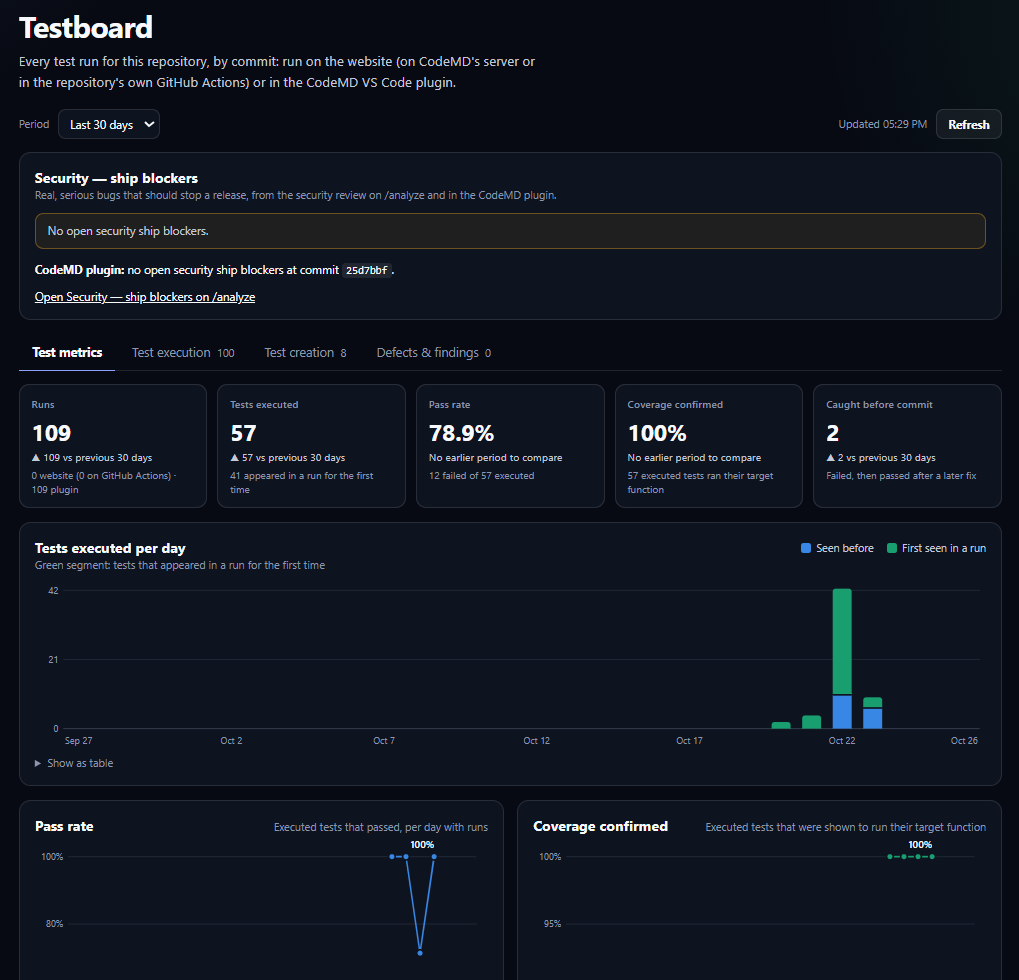
Your team's testing, in one view
Testboard brings together your repository's test runs from the website and the CodeMD VS Code plugin. See tests executed, pass rates, whether tests reached their target functions, bugs caught before commit, and security ship blockers.
Why run only the relevant tests?
So it often doesn't get run before a commit. A focused set of tests runs in seconds.
Especially with AI-written code. CodeMD checks the code you actually touched.
CodeMD uses the tests you already have. Your source files are never modified.
Finds relevant tests for Python, JavaScript/TypeScript, Java, Kotlin, C#, Go and Rust; runs existing tests directly for Python, Go, Java, Kotlin and C#. Creates missing tests for Python, JavaScript/TypeScript, Java, Kotlin, C#, Go and Rust.
Know before you commit.
Install the free VS Code extension and run the tests that matter for your next change.